SCOUT case study
Project Overview
What is it?
Scout’s mission is to provide hikers of all skill levels easy-to-access and understand trail knowledge so they can plan, enjoy, and share their thrilling adventures with others.
Goal
- Encourage hikers of all levels to take up hiking and plan for their trip.
- Connect users by providing physical and virtual social experiences for users to explore, gain feedback, and share with others.
- Provide hikers with an accurate and accessible user interface to efficiently navigate their trip from start to finish.
- Provide environmental knowledge for our users to connect and care for our planet and themselves.
- Make hiking more accessible to users of all levels.
- Provide users with safety resources with or without cellular service.
- Focus on the needs and pain points of our hiker
Role
As part of a collaborative team of designers, I actively participated in the UX design process and took the lead in translating ideas and concepts into engaging UI designs and interactive prototypes.
Users
All Hikers: Hikers of all skill levels, Visiting hikers, hiking groups
time frame
8 weeks
Why this project?
SCOUT's collaborative efforts were driven by a shared commitment to enhance communication and safety along hiking trails. Recognizing a gap in addressing safety on less-navigated paths through traditional GPS navigation, our goal was to make hiking exciting, safer, and accessible for everyone. We dedicated ourselves to actively listening to hikers' concerns and feedback, gaining grounded insights into their needs. Beyond safety, our focus extended to ensuring a comprehensive and peace-of-mind experience for hikers throughout their journey.

Research Methodology
Research
Competitive analysis, social media reviews, comments analysis.
Qualitative Interviews
Participants: Six hikers of all skill levels, one subject matter expert.
Components: Screener survey, consent form, informational interview (45 minutes to 1 hour).
Prototype & Usability testing first round
Participants: Five hikers of all skill levels (Three returning interviewees).
Components: Low-Mid Fidelity prototype, guided scenarios user testing, A/B user testing, and SUS & SUPR-Q survey.
Prototype & Usability testing second round
Participants: Three hikers of all skill levels (One returning interviewees).
Components: High Fidelity prototype, guided scenarios user testing, and SUS & SUPR-Q survey.
The competition
Full Competitive Analysis Upon Request
Competitive Analysis
Review: 5 Related resources
Result: 3 Direct competitors
Closest competitors
All Trails, Gaia GPS & National Park Service
Overview
Strengths
Opportunities

A fitness and travel mobile app used in outdoor recreational activities such as hiking, mountain biking, climbing and snow sports.
Wide network of maps with crowdsourced information, community of users, impressive hiker safety features
Effective offline use, smart watch integration

A backcountry trail and camping navigator with leading navigation tools-no cell service required.
Offline capabilities
Battery optimization, download speeds

Comprehensive guide to hiking and sightseeing in US National Parks.
Information on trails as well as amenities, National Parks maps and visitor guides, 100+ year legacy including design
Increased desire for nature-based vacations, intuitive and clean app organization and design
Research Interviews
Participants: Six hikers of all skill levels
Criteria: Screeners, qualitative interviews with one interviewer and one notetaker per session, lasting 45 to 60 minutes.
Research Goal:
- Understand why people hike
- Gain insight into the experience of hiking
- Learn how people prepare & locate trails
- Empathize with challenges hikers face
- Ideate design solutions
Criteria for recruitment: We were seeking participants aged 18 and above with any level of hiking experience.

Main findings
Full Research Analysis upon request
Humans & Nature
Hikers want to connect to nature, see interesting wildlife, and explore scenic landscapes
Navigation Challenges
Hikers are safest when they are in a group, especially when they can learn from senior, experienced hikers.
Preparation & Safety
- Preparation is key for a positive hiking experience, hikers need to know what to pack for different hiking trips.
- 4 out of 6 interviews revealed that hikers are not prepared for emergencies and utilize their phone even when they know service is not reliable
Amenities
Hikers need access bathrooms with plumbing and drinking water and the ability to check to see if there is food or shopping nearby. They also need to be able to access this beforehand, while planning their hike.
Central Themes & Patterns
Desire to Connect with Nature
Core Findings: 6/6 participants acknowledged this as a motivation to hike.
“I really like just being outdoors and being active. And part of it is also my just like general interest in nature.” – SKS
Navigation is Key
Core Findings: 6/6 Hikers dedicate a period of time to planning and packing. Preparing helps hikers feel safer on the trail and better equipped to handle emergencies.
“I lose internet sometimes and the downloadable maps sometimes don’t match reality so it’s scary and it would be nice to have a backup map” – ME
Safety & Preparation are Important
Core Findings: 6/6 participants felt safer hiking with friends than hiking solo, and good preparation would help them feel safer.
“I am aware of where I am and how to get back. Sometimes I need to sign in and out with the rangers for longer trips, But I always tell friends and family where I will be hiking, and share the route with them.” – TM
Social Engagement Shifts for Hikers
Core Findings: 2/6 participants were interested in social engagement. 4/6 participants looked at hiking as a meditative experience and preferred to hike with 1 or 2 friends.
“I feel like it’s my alone time to think away from the word, I am also focused on where I am stepping so it’s a chance to be more present” – ME
Research summary - Next steps
social
- Provide an avenue for hikers to connect and join hiking groups
- Encourage hikers to join due to safety concerns
- User driven notes and comments on trails
- A way to share images, reviews and trail content after a trail has been completed
Navigation & Safety
- Help notify hikers of hazards or conditions on the trail beforehand
- Your location on a map with directional facing location
Preparation
- Develop a solution that will help hikers prepare for the trail
- Pictures of trails, reviews, interesting features of the wilderness - user generated content
- Pack list recommendations based on trails difficulty and distance
Health & Fitness
- Give hikers fitness feedback upon completing a hike
- Information about hike such as incline, steps, length

Personas & journeys
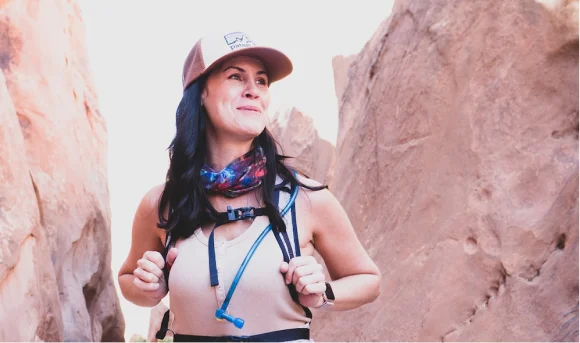
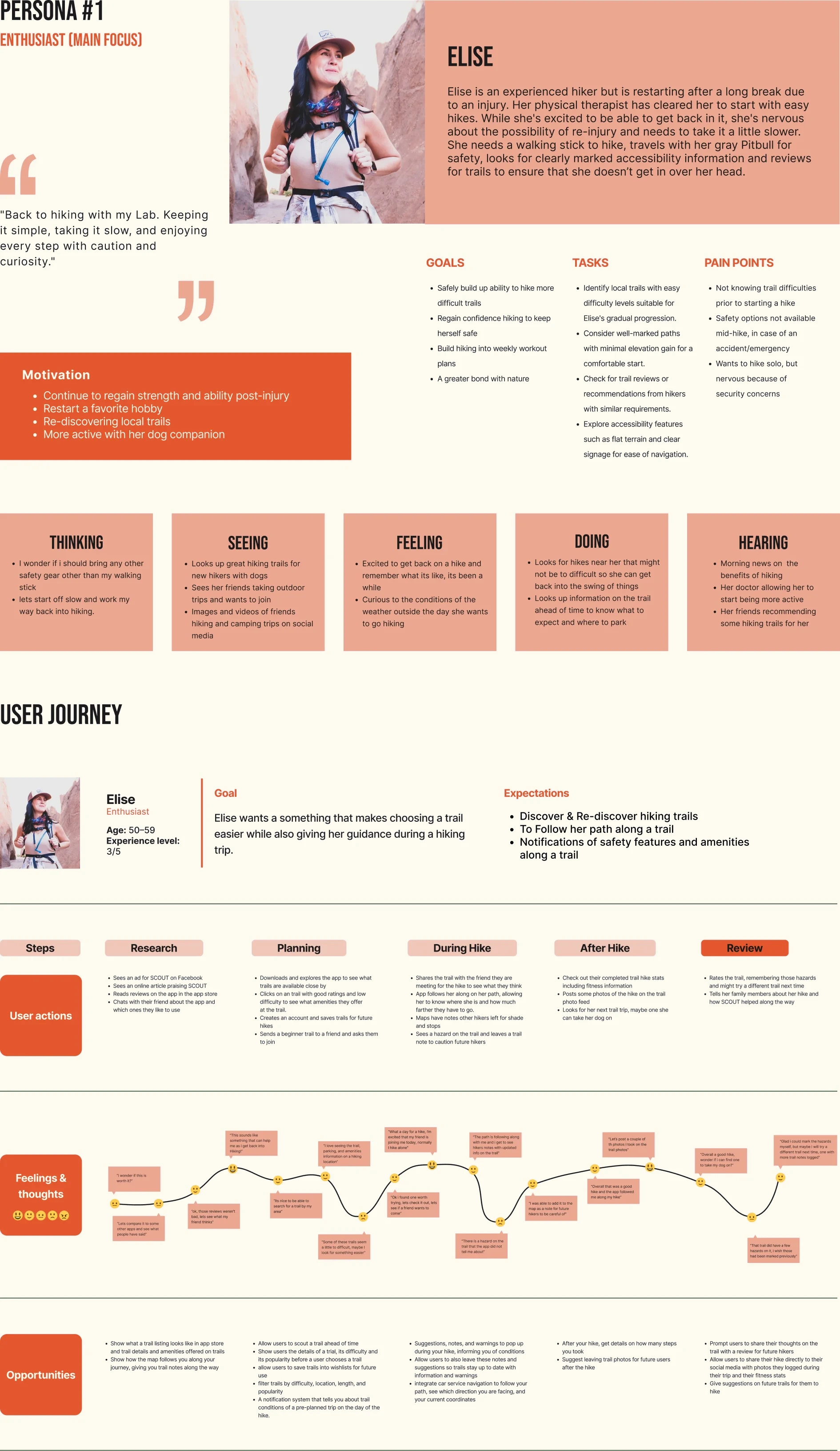
Elise
Enthusiast (Main focus)
Elise is an experienced hiker recovering from injury, who enjoys the outdoors and likes to bring along her dog for company and safety.

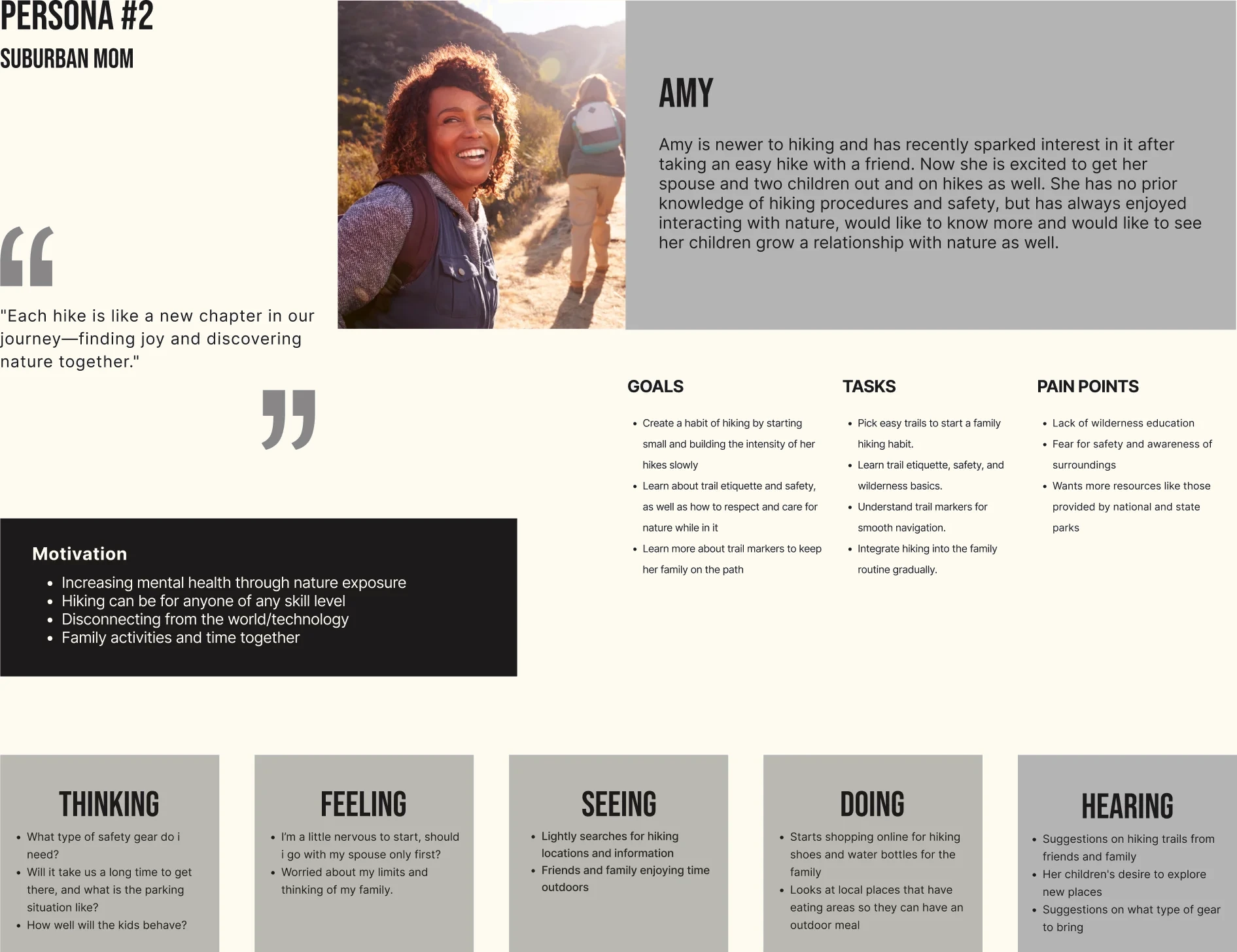
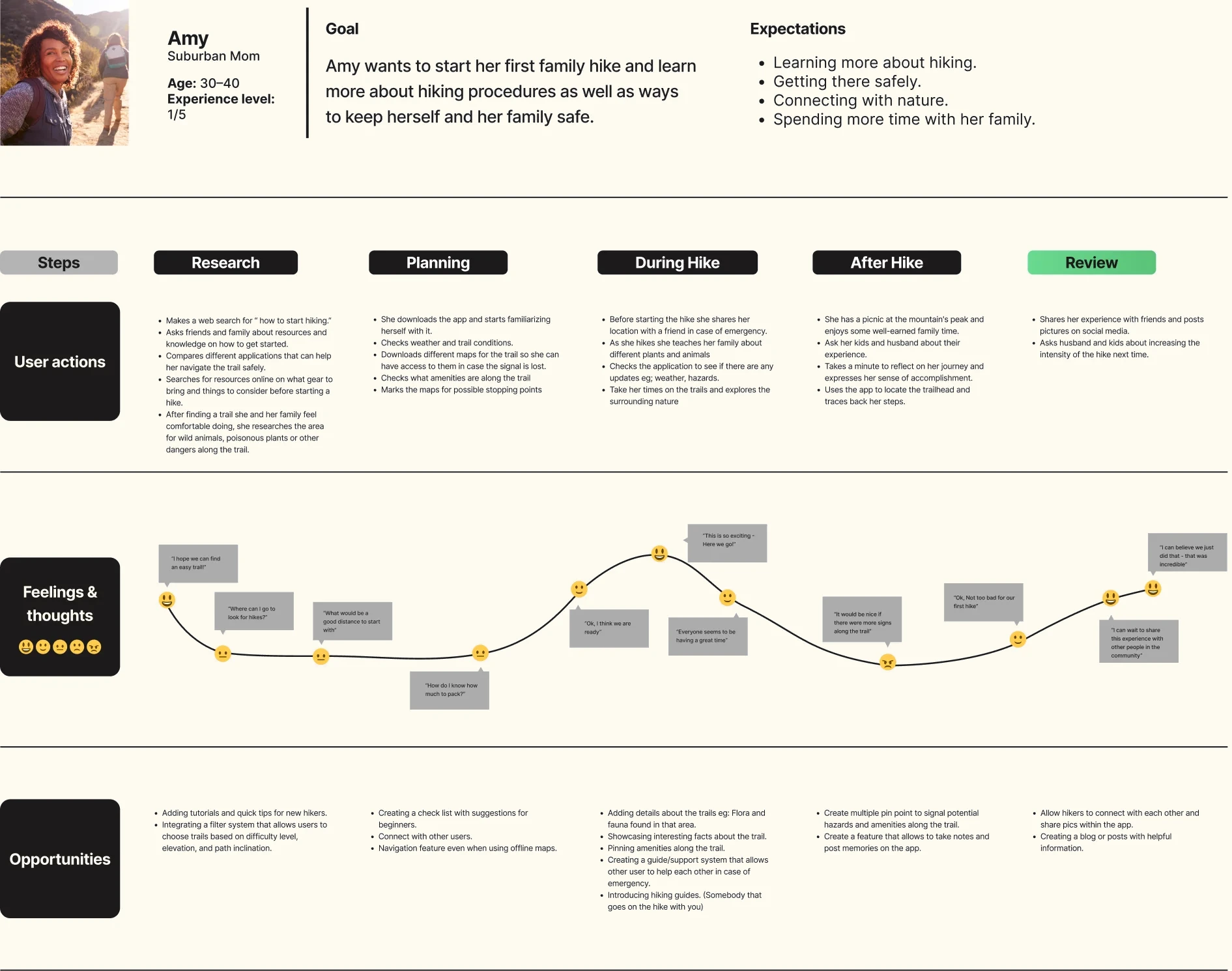
Amy
Suburban Mom
Amy is new to hiking and is eager to introduce her family to it, hoping to foster their connection with nature while learning about hiking safety.
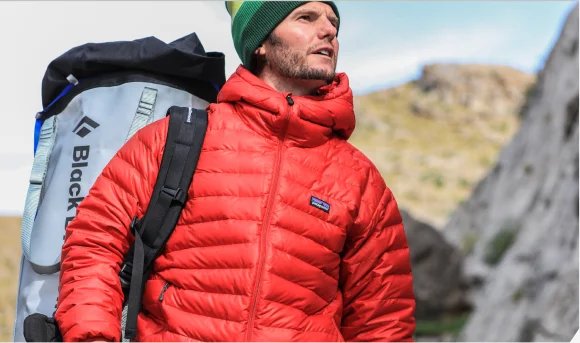
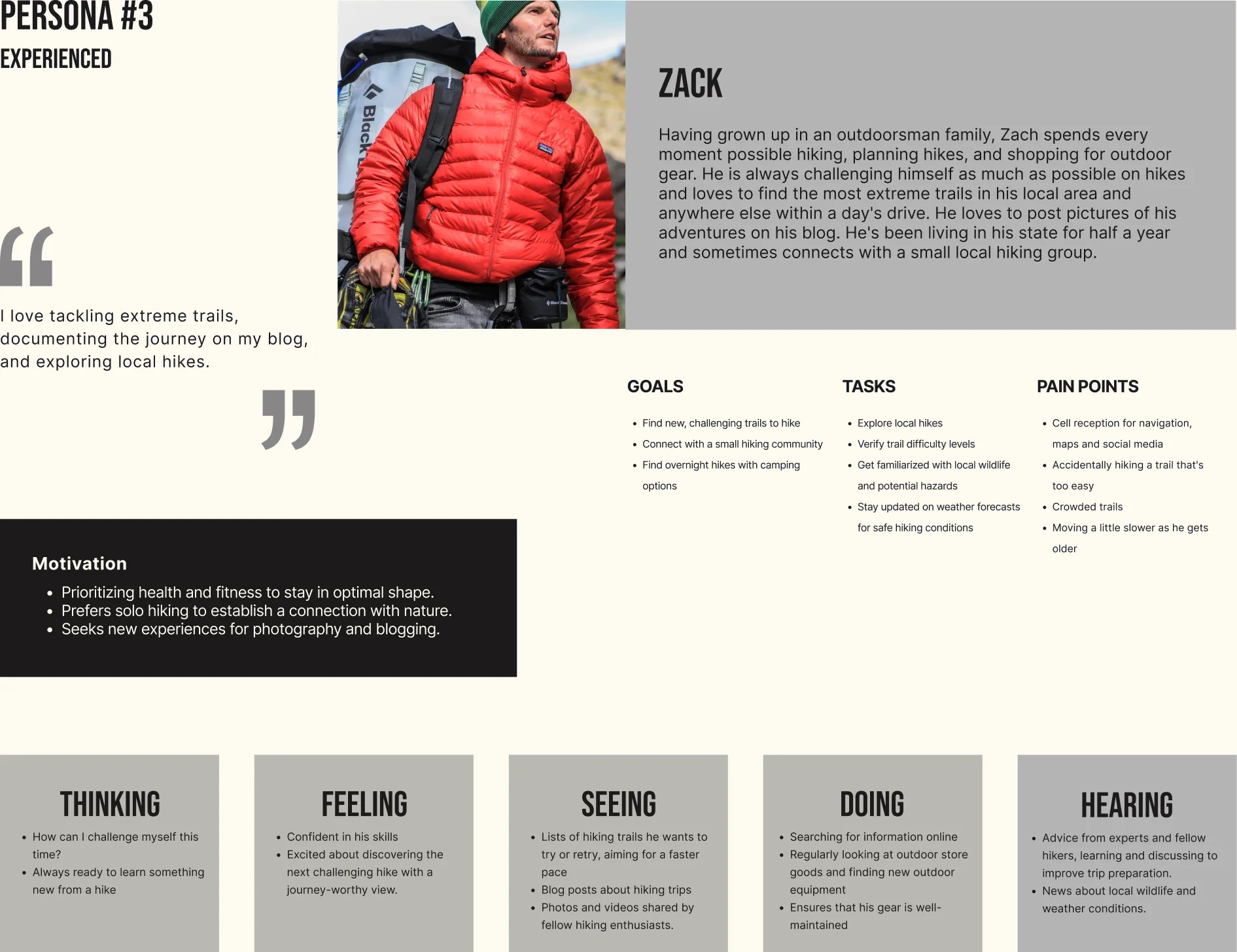
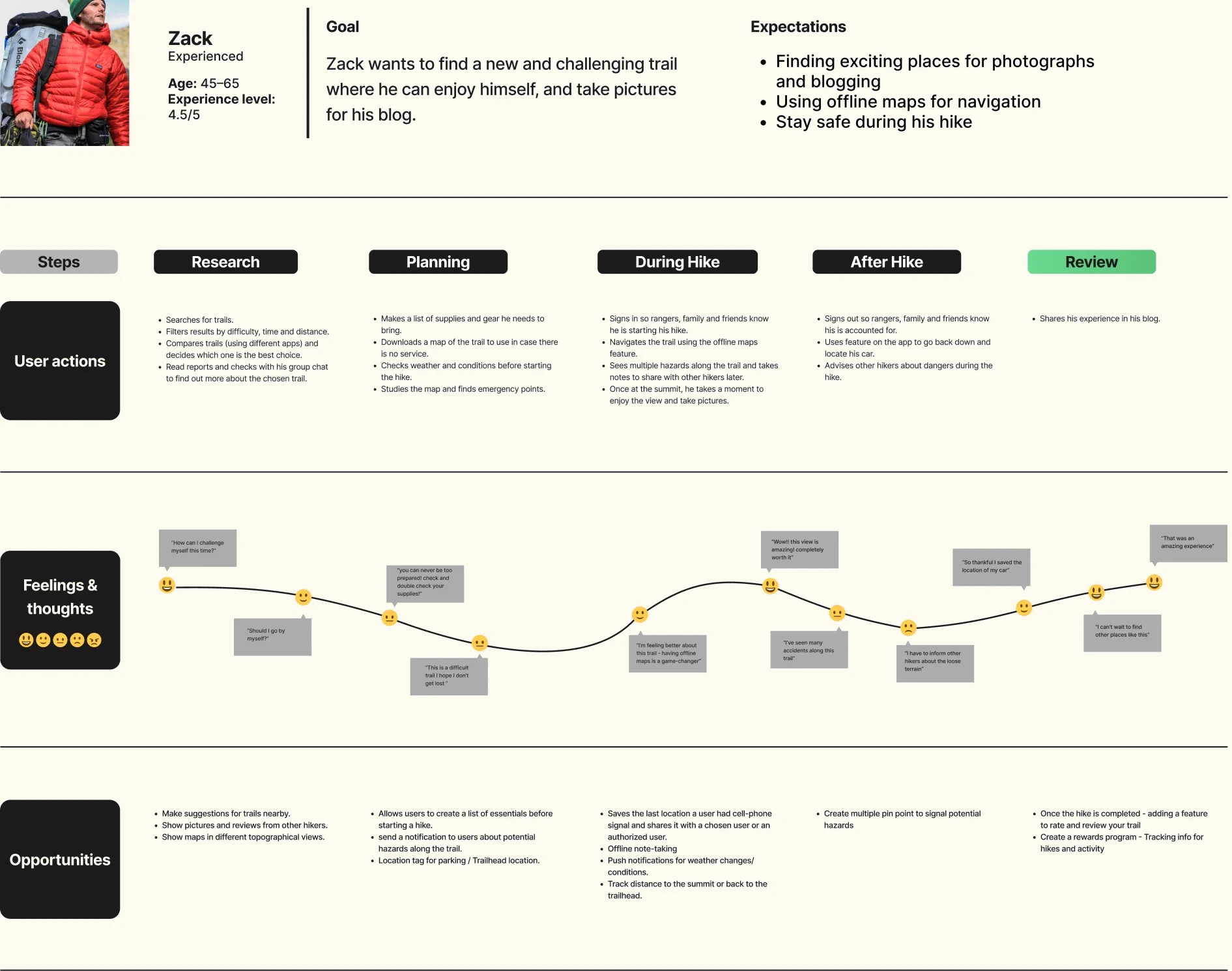
Zack
Experienced Hiker
Zack, raised in an outdoorsy family, spends every moment hiking, seeking extreme trails, and sharing adventures on his blog.

Information architecture
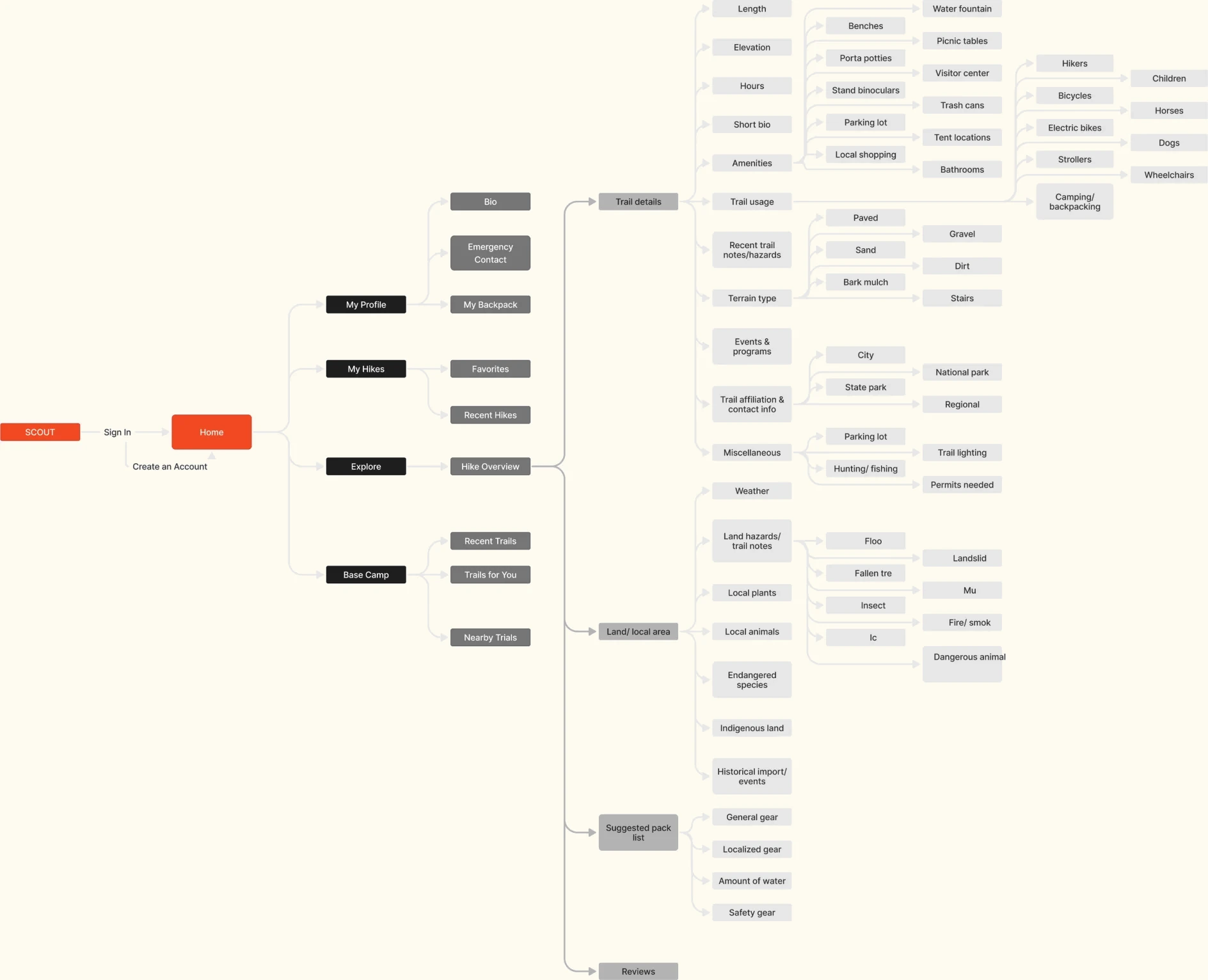
The information architecture (IA) served as the cornerstone for SCOUT; it was the starting point where we explored how this app could operate and envisioned the diverse features it could incorporate.
Story boards
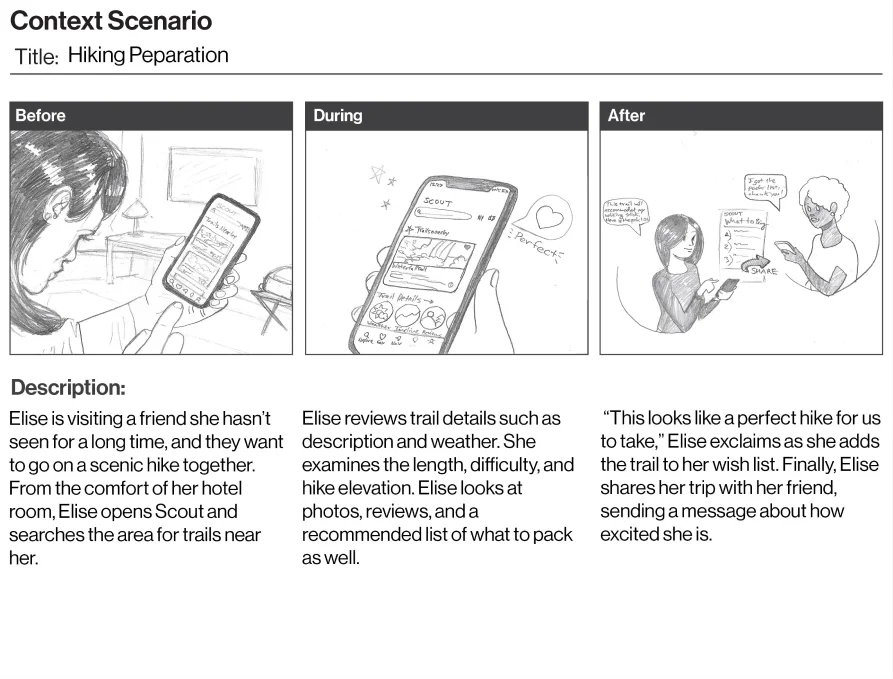
Storyboards helped us map how hikers would plan, start, and finish a hike, shaping the core features: My Packing List, the Scout Hike button, Trail Notes, and Trail Reviews.

User flows
Full user flows upon request
Pre-hike
- Browse hikes in her area
- Filters the list to search for only beginner hikes and those that are 5 miles or under
- Chooses a new listing, looks over trail details, current weather, suggested packing list, and adds it to the wishlist
- Shares the trip with a friend

Mid-hike
- Meets friend at the trailhead and starts their hike journey on Scout
- Sets a trail note for a scenic view, takes a photo
- Receives a trail notification for a muddy section on the path and warns her friend
- Avoids the mud and gives the note a time stamped thumbs up

Post-hike
- Take small Break at a suggested picnic area and proceed to finish her hike
- Rates the trail, Leaves a comment & Adds a photo to the trail
- Shares her uploaded photo on her social media
- Adds this hike to her favorite hikes list

A/B Testing
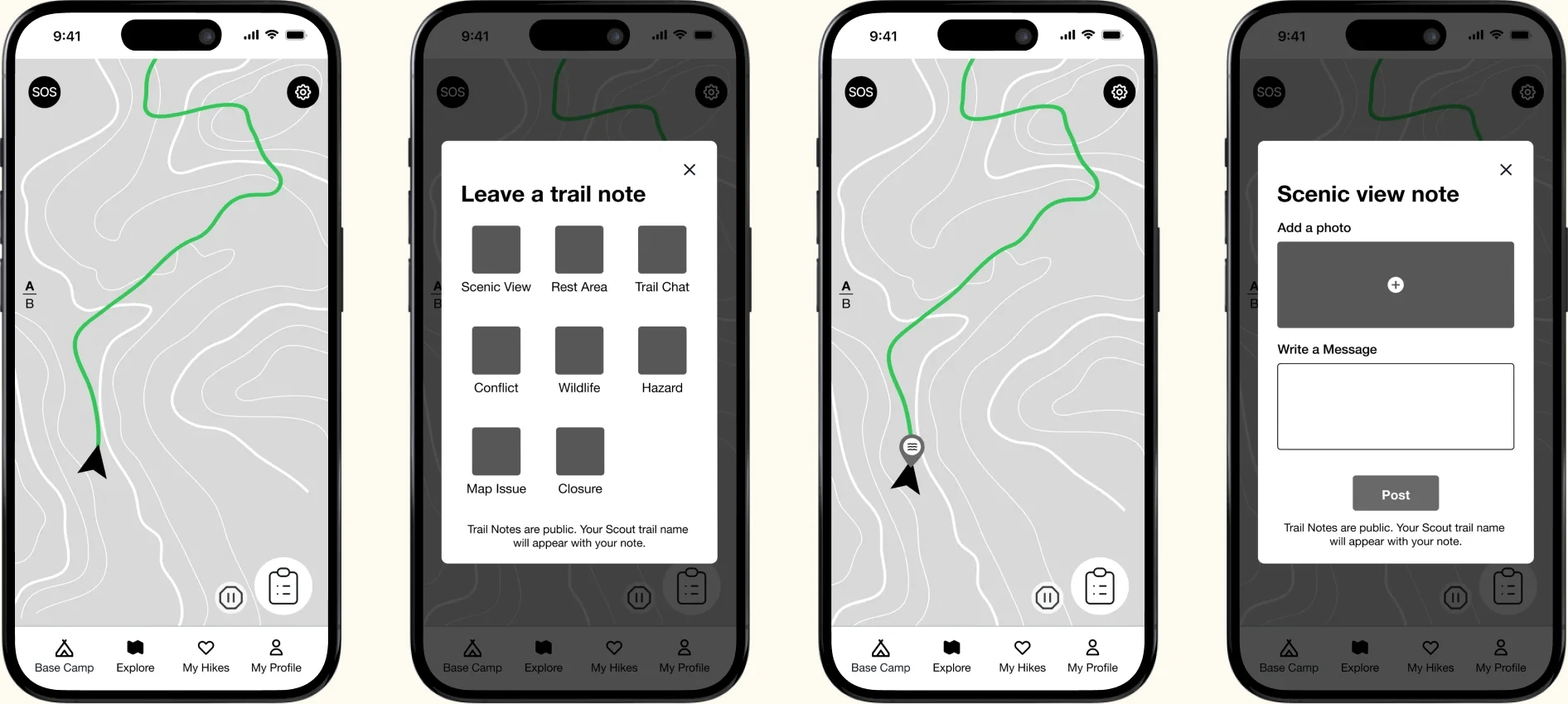
Option A
Hikers tap a note button on the map and choose from a grid of trail note categories, like scenic view, rest area, wildlife, or hazard. Each category opens its own note to add a photo and message, and the note is placed at the hiker's current location.
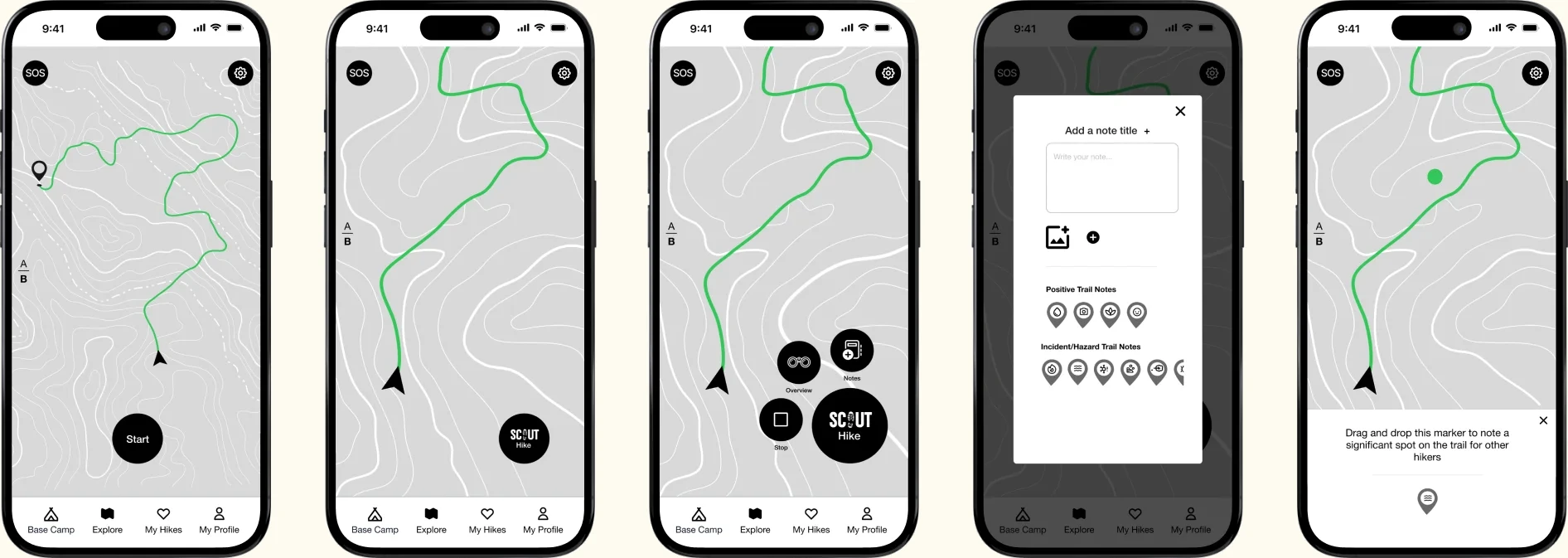
Option B
Hikers open the Scout Hike button, which expands into a menu, and add a trail note from one form with a message, photo, and positive or hazard tags. They then drag and drop a marker to pin the note exactly where they saw it.
Scout in action
Low-Fidelity Prototype
This completed prototype is the culmination of eight weeks of development and research.
Prototype available on request.
User testing
First round
Participants: Five hikers of all skill levels (Three returning interviewees).
Criteria: screeners, low fidelity prototype, guided scenario user testing, A/B testing, and SUS & SUPR-Q survey
Criteria for recruitment: We were seeking participants aged 18 and above with any level of hiking experience.

Main findings
Full usability testing report available on requestfirst round
1. Trail Note Interaction (A/B)
Testers saw strengths in both options. The Scout Hike menu from Option B kept trail tools in one place, while Option A's note categories made it clearer what kind of note to leave. We combined both and added an editable pin, so hikers could place notes exactly where they saw something.
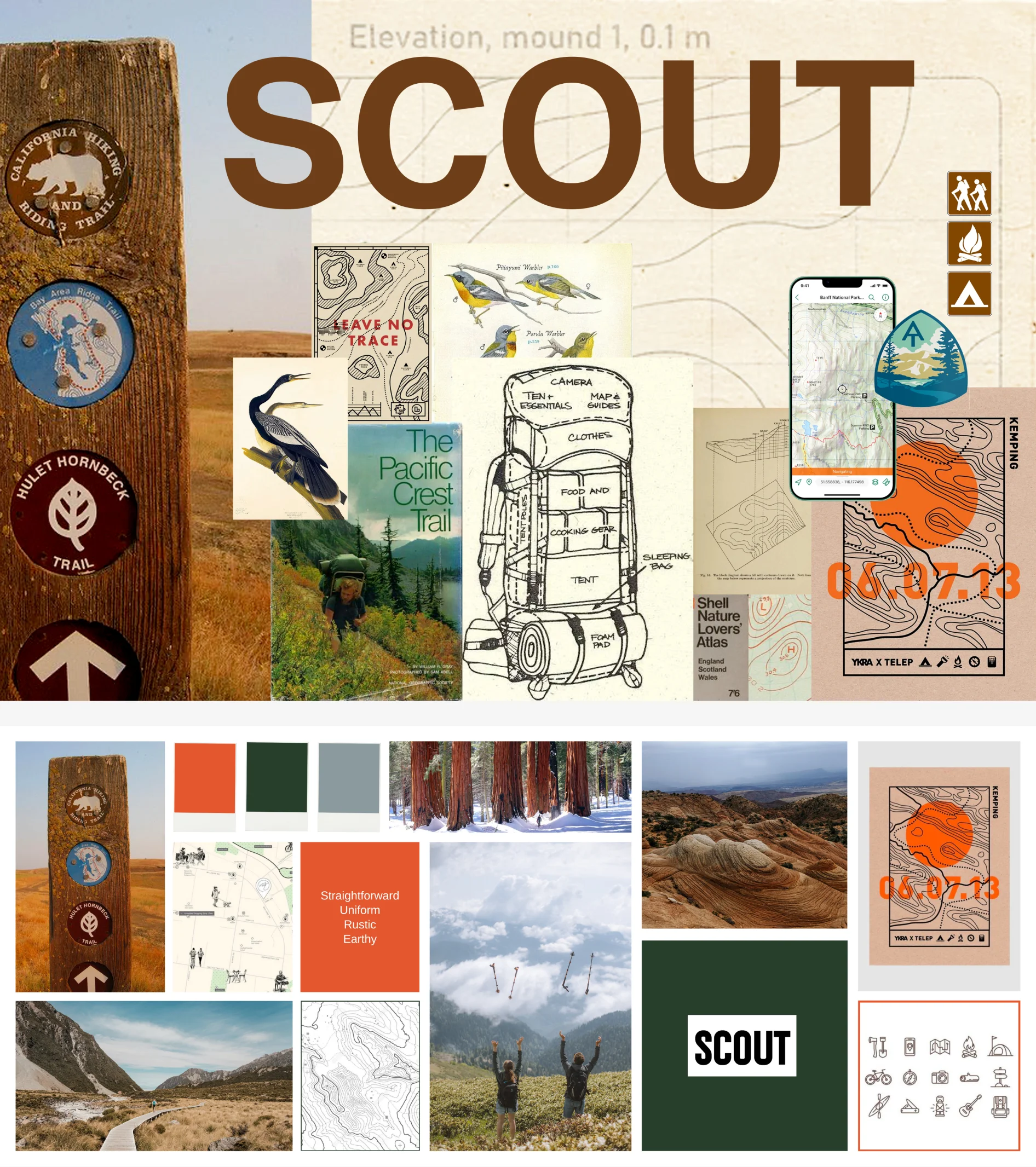
Mood board
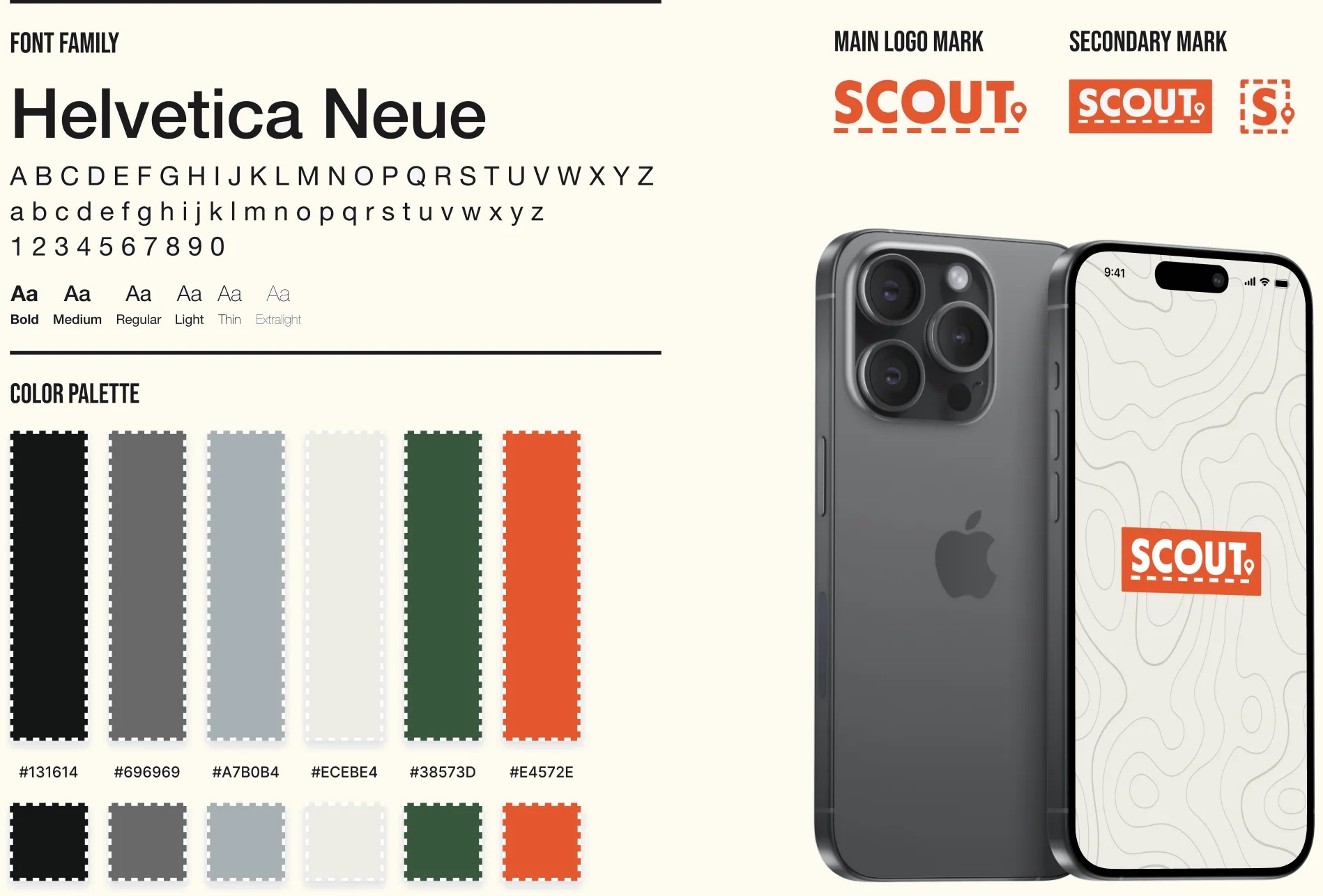
Visual design
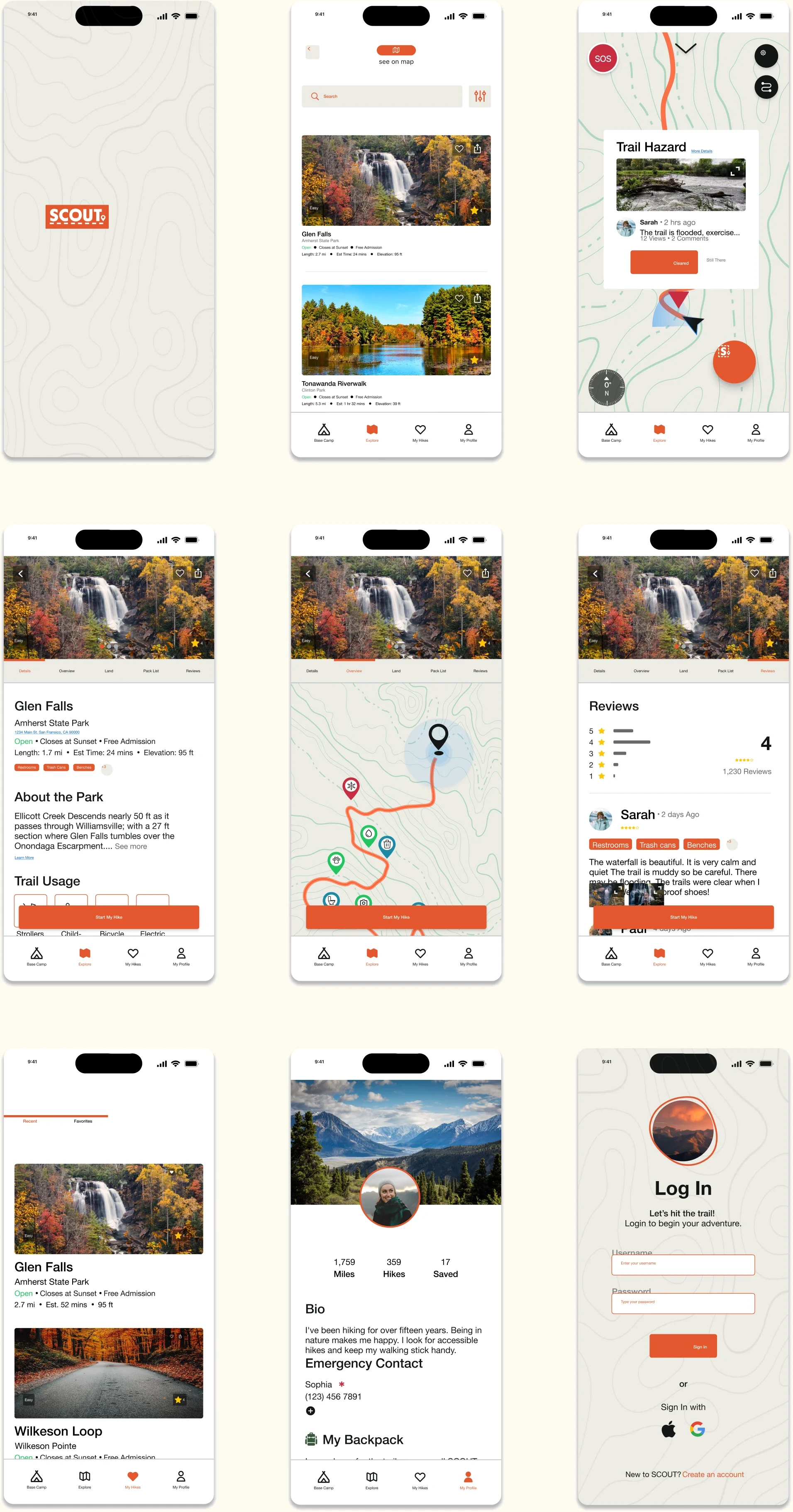
High Fidelity screens
User testing
Second round
Participants: Three hikers of all skill levels (One returning interviewees).
Criteria: screeners, high-fidelity prototype, user testing, guided scenarios (35-45 minutes)
Criteria for recruitment: We were seeking participants aged 18 and above with any level of hiking experience.

Finding #1
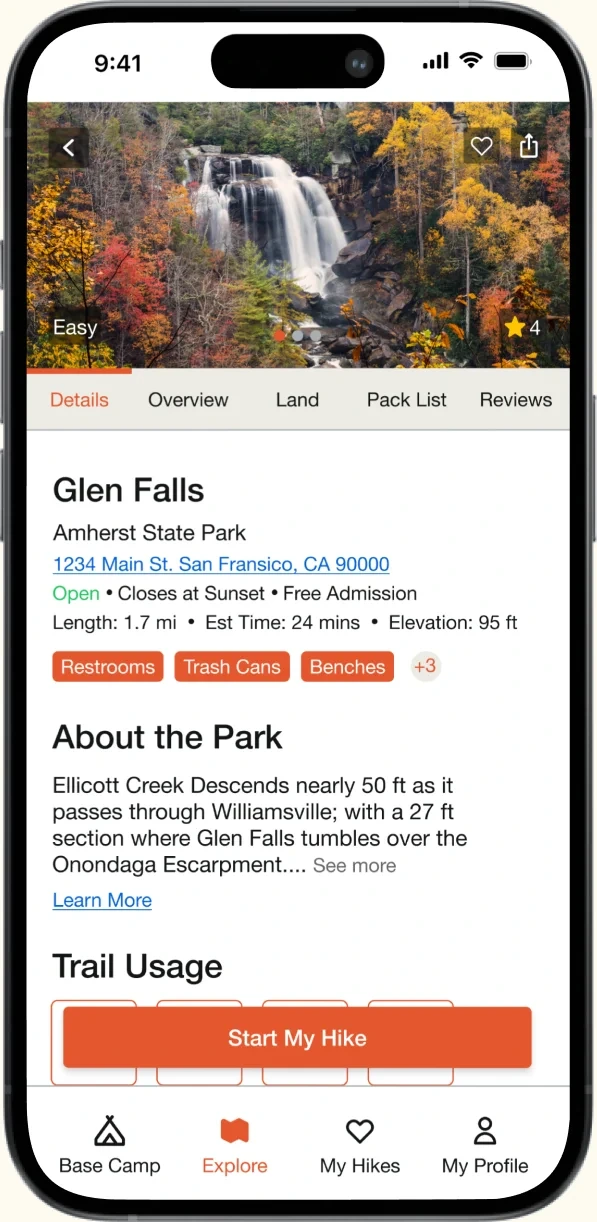
Trail Details
Our hikers loved
- Seeing the trail details & amenities provided
- Looking over reviews
- Information was accessible and easy to navigate
things that needed improvement
- Reviews could have a ‘sort by’ to customize viewing
- The location of Starting to navigate your hike changed to a more prominent location in the center bottom of every screen
Heuristics Observed
#5: Error Prevention
NEGATIVE – Difficulty: 3 of 5
Users experienced frustration clicking the ‘Glen Falls’ selection from the search list as only the image and not the full card connected to the next slide.
#6: Recognition Over Recall
POSITIVE – Difficulty: 1 of 5
Users navigated through trail details efficiently, stating their information was easy to digest, and navigate their way back to. Minor changes to icons could improve this further.
Nielsen Norman Group 10 Usability Heuristics for User Interface Design
Finding #2
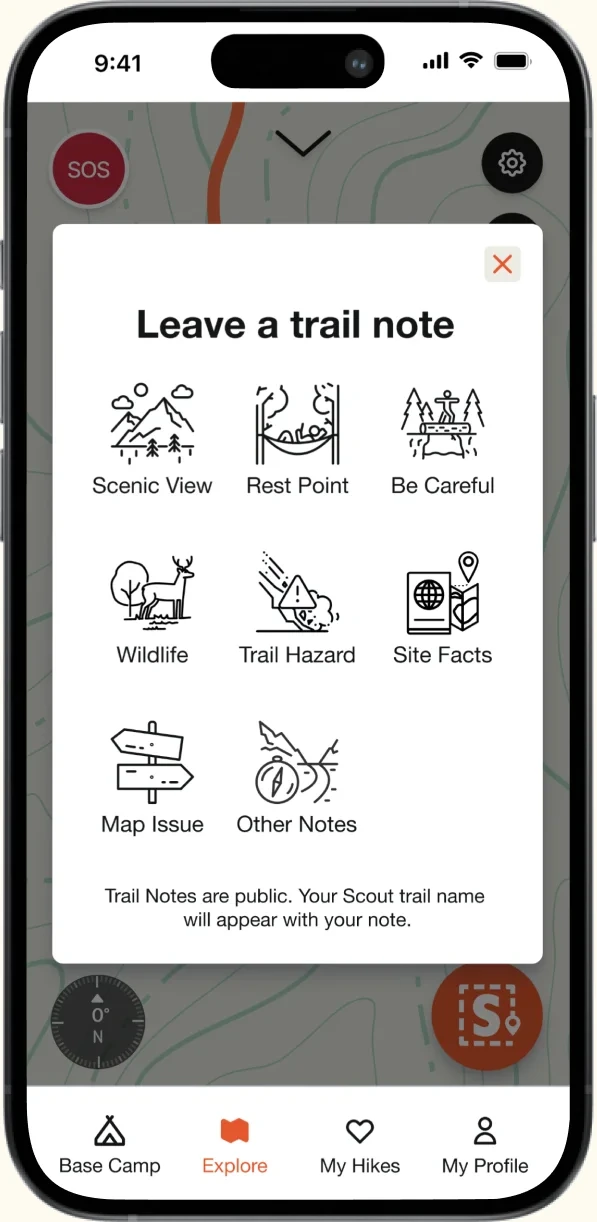
Trail note
Our hikers loved
- The idea of adding trail note and helping other hikers along a trail.
- Opening a small “Hiker’s kit” in the corner of the map was an engaging interaction for all testers.
things that needed improvement
- Editing the location of the note is yet to be streamlined.
- Finding the trail notes button was a bit tricky as the “S” button hadn’t been introduced before hand and was unfamiliar to testers.
Heuristics Observed
#7: Flexibility & Efficiency of Use
NEGATIVE – Difficulty: 2.5 of 5
Users experienced frustration when editing the trail note location. Some didn’t know how to add it while some didn’t see the “Finish edit location button” on the bottom.
#2: Match System & Real World
POSITIVE – Difficulty: 1 of 5
Users knew what to do when adding a trail note and adding the note and pictures seemed intuitive. Minor changes to edit pin location required.
Nielsen Norman Group 10 Usability Heuristics for User Interface Design
Finding #3
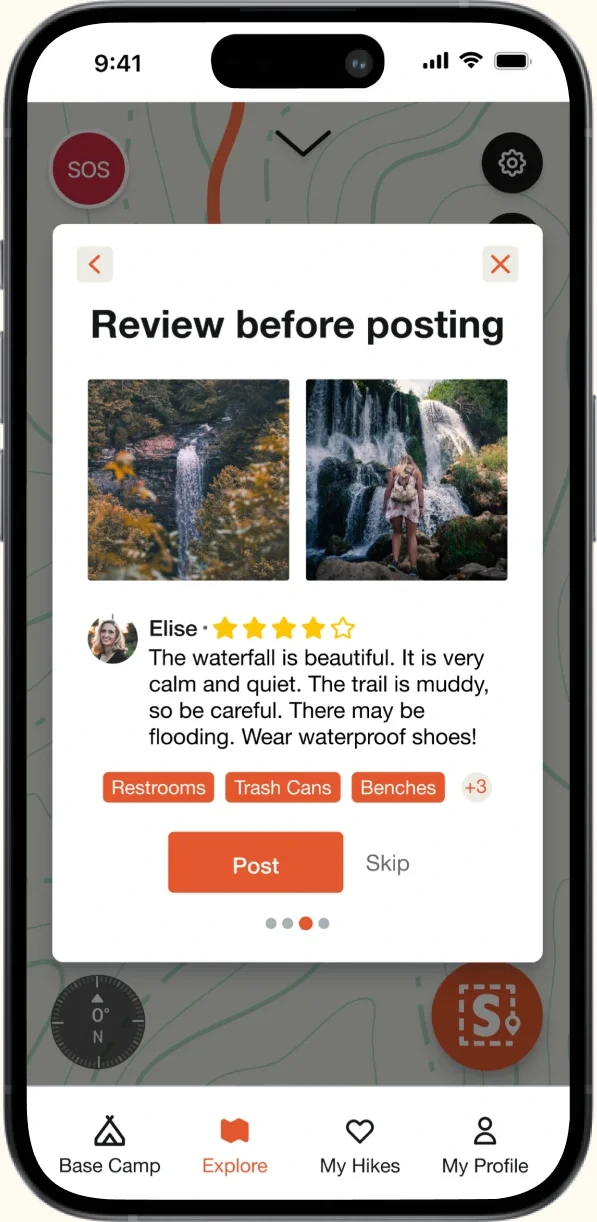
Trail review
Our hikers loved
- Being able to rate the trail and provide feedback after their hike.
- Being able to add tags to the things that they saw so other hikers would know what to expect.
things that needed improvement
- The flexibility to add a review at a later time
- There are repeat tags in the review section
Heuristics Observed
#3: User Control & Freedom
NEGATIVE – Difficulty: 3 of 5
Some users wanted the ability to add the review at a later time. This will allow them some freedom to add the review whenever they want.
#6: Recognition Over Recall
POSITIVE – Difficulty: 1 of 5
Users recognized what they needed to do and followed the steps seamlessly as it has been familiar to other apps they have used.
Nielsen Norman Group 10 Usability Heuristics for User Interface Design
Scout in action
High-Fidelity Prototype
This completed prototype is the culmination of eight weeks of development and research.
Prototype available on request.Next steps
Recommendations from User Testing
- Better resolve the design for editing Trail Note pin location.
- The ability to skip a review until the next time you visit the app.
- A clearer icon for main navigation menu while on a hike.
- A more clear location for where ‘My Backpack’ resides.
Next Features to Explore
- Scout onboarding with quick tags to customize Scout to hiker preferences
- SOS Systems with safety products
- Expanding ‘My Backpack’ section and Hikers profiles with clear intent
- Apple Watch integration to allow hikers to track their hike through their watch
Lessons learned
- Text helps add context to icons.
- Different mental models can combine to create better UX.
- Just because something is clear to us, doesn’t mean it’s clear to our users.
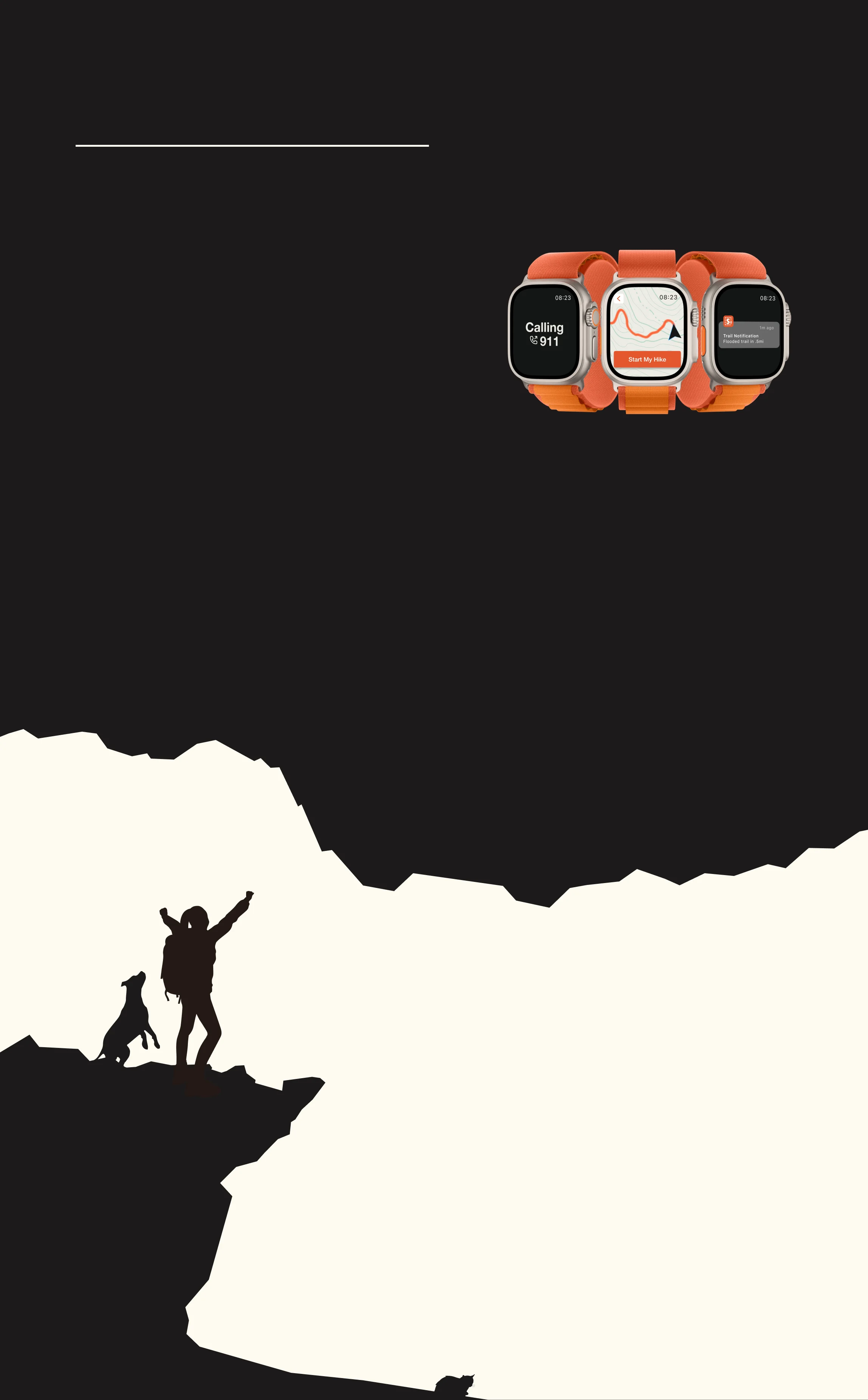
Scout for Apple Watch enables hikers to disconnect from their phones. This feature allows them to track their hike through the watch, receive safety notifications, and, in the event of a fall detected by Scout's impact sensing capability, hikers can use the watch to call 911 when necessary.
fin
For more information or to learn more about this project, contact me at jfgechem77 [at] gmail.com

